
LinkedIn automation safety for recruiters has become a crucial topic as more firms rely on outreach tools to scale conversations. Yet most agencies still fall into spam traps…
How to scale your outreach, protect your account, and book high-quality meetings without risking your reputation.
LinkedIn is the most powerful deal-flow engine available to recruitment and search firm owners but it’s also the easiest platform to destroy if you treat it like a numbers game.
Most agencies still “spray and pray,” blasting generic templates, sending bulk invites, and hoping something sticks. The result?
- Damaged credibility
- Low acceptance rates
- Flagged accounts
- Missed opportunities
- Conversations with the wrong people
In the Appointment Booking AI Masterclass, Phil Pelucha breaks down exactly how to avoid these mistakes and instead run an outreach system that is personalized, compliant, and converts.
This guide compiles those insights into a clear, recruiter-specific playbook.
Why “Spammy” LinkedIn Outreach Hurts Recruiters More Than Anyone Else
Most spam issues arise because LinkedIn automation safety for recruiters is ignored. Recruitment is trust-driven. Decision-makers don’t choose a recruiter because they sent 200 messages a day. They choose based on:
- AUTHORITY
- EXPERTISE
- RELEVANCE
- TIMING
- MARKET UNDERSTANDING
When your outreach looks like spam, you signal the opposite.
Phil emphasises that recruiters need to be partners, not vendors. Automation should amplify authority—not make you look like an automated bot pushing jobs.
The Real Definition of Spam on LinkedIn
Spam isn’t just sending too many messages. Spam is:
- Sending irrelevant messages
- Over-pitching too early
- Inviting too many people at once
- Following up too aggressively
- Using templates that sound like every other recruiter
- Not stopping a sequence when the person replies
- Using automation tools that violate LinkedIn’s activity limits
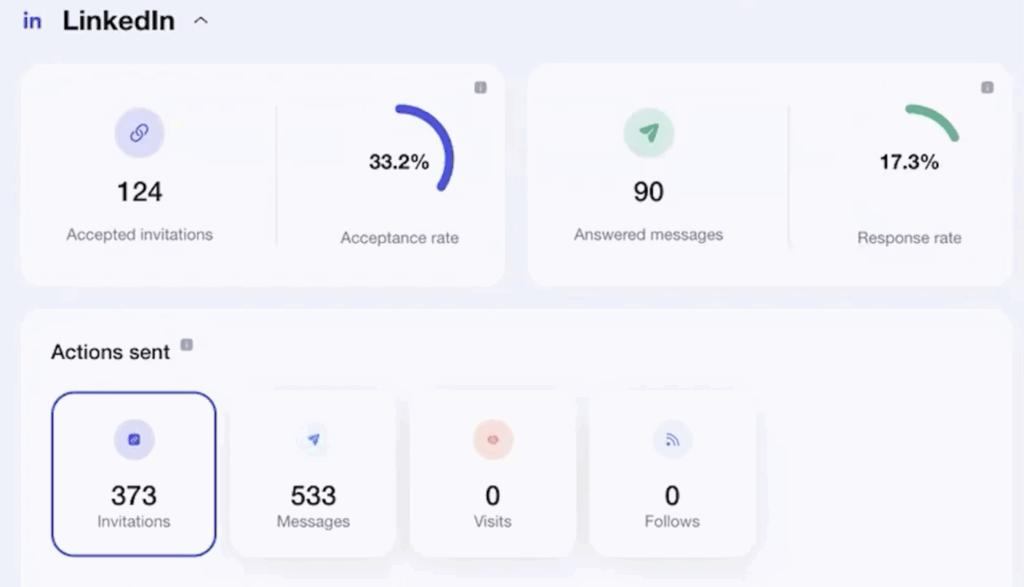
In Phil’s live demo, he shows how using the right automation sequence led to 33.2% acceptance rates and 90+ warm replies—without being spammy.
Best Practices for Safe, High-Conversion Automation
The foundation of LinkedIn automation safety for recruiters is respecting natural sending limits. These best practices come directly from the masterclass and the real campaigns Phil builds for clients.
Build Sequencing Around Human Behaviour – Not Volume
The winning sequence is simple:
- Connection Request (light, relevant, non-salesy)
- Authority Intro (value, credibility, curiosity)
- Direct Invite (optional, 3–5 days later, framed around insight—not a pitch)
Phil’s campaign example:
- Message 1: Friendly invite referencing the recipient’s space (AI/ML, founders, exec teams)
- Message 2: An authority intro with a “quick question” CTA
- Message 3: Low-pressure invite to a 15-minute insight call
This structure performs because it respects your prospect’s time, avoids hard selling, and uses credibility instead of pressure.
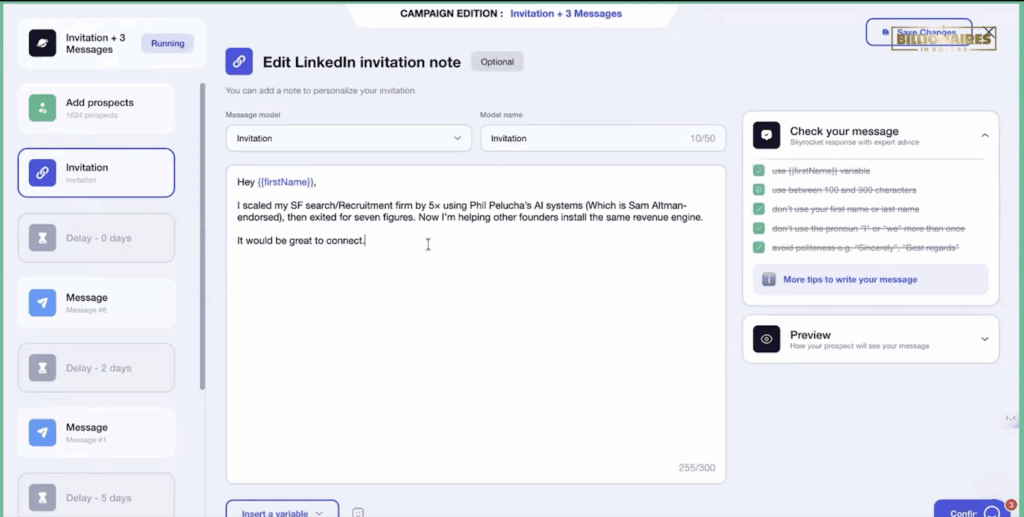
Keep connection requests under 300 characters
Shorter messages reduce friction and do not trigger LinkedIn’s spam filters.
In the transcript, the internal checklist highlights:
- Use {{firstName}}
- Stay within 100–300 characters
- Don’t overuse “I” or “we”
- Remove unnecessary politeness (“Best regards”, “Sincerely”)
These micro-optimizations dramatically increase acceptance rates.
Use automation tools that slow actions to natural human speed
Phil stresses this heavily:
Your tool must mimic human rhythm.
That means:
- Controlled number of daily invites
- Variable sending speed
- Auto-pausing when a message is replied to
- Safe limits for messages, profile views, follows
- Tools that blast 100 invites at once get flagged.
- Tools that drip-feed 15–20 invites over the day stay safe.
Your automation should never behave like a bot.
Never automate follow-ups to people who reply
This is the fastest way to get marked as spam.
Phil demonstrates a campaign where:
- Once someone replies, the sequence stops immediately
- A human takes over
- The AI supports reply crafting to maintain quality
This hybrid approach “feels” personal and keeps your account healthy.
Use authority-led messaging not pitch-led messaging
Your sequences should not say:
- “Are you hiring?”
- “Can we help you with roles?”
- “Do you need candidates?”
Instead, Phil bases messaging on:
- Insight
- Industry pattern recognition
- Proven outcomes
- Problems founders already feel
EXAMPLES:
- “Every wrong hire burns 3–6 months of runway.”
- “We got 2 hires from 5 intros, not 1 from 50.”
These angles attract serious founders, not job-posters.
Rotate messaging angles to avoid pattern flags
LinkedIn monitors repetitive content.
The masterclass outlines three angles that can be rotated safely:
- SPEED VS RUNWAY
- PROOF VS PROMISE
- FOUNDER FLUENCY
Using these variations avoids repetitive templates and keeps your account compliant while increasing engagement.
Set Daily Activity Caps Based on Account Age
Phil explains this clearly:
- New accounts: 10–20 invites/day
- Warm accounts: 20–40 invites/day
- Established accounts: 40–70 invites/day
The key is consistency, not spikes.
LinkedIn flags sudden jumps (e.g., from 10 → 80 invites overnight).
Automation should scale slowly and safely.
Always personalise the first 1–2 lines
Even with automation, do not sound robotic.
Phil shows how using variables like:
- {{firstName}}
- {{companyName}}
…combined with contextual relevance (“saw you’re building in the AI/ML space…”) boosts acceptance rates dramatically.
This is how he achieved the 33.2% acceptance rate shown in the masterclass analytics.
The AI Advantage: Keeping Messages Natural, On-Brand, and High-Converting
Appointment Booking AI doesn’t just automate outreach—it ensures every message:
- Sounds human
- Matches your tone
- Aligns with your authority
- Uses safe formats
- Stays within LinkedIn’s limits
You can even paste incoming replies into the system and get:
- A corrected, high-authority response
- A clearer call to action
- A response that keeps the conversation warm
This prevents mistakes, protects your reputation, and trains junior recruiters to behave like experienced consultants.
How to Scale Without Becoming “That Recruiter”
The whole philosophy is simple:
AUTOMATE THE REPEATABLE
Humanize the critical.
Enhance everything with AI.
With the right system:
- Your account stays safe
- Your credibility increases
- LinkedIn treats you as a trusted user
- Your sequences convert consistently
- Your diary fills with qualified calls
Spam is the shortcut that never works.
Authority is the engine that scales predictably.
Final Thoughts: Your Biggest Risk Isn’t Automation, It’s Using It Wrong
Our Appointment Booking AI system is built around LinkedIn automation safety for recruiters, ensuring all actions stay compliant. Recruiters aren’t punished for using automation. They’re punished for using bad automation.
Phil’s masterclass makes it clear:
- Use the right limits
- Use the right message style
- Use the right pacing
- Stop sequences when replies come in
- Rotate your messaging angles
- Use authority instead of pitching
Following these principles guarantees long-term LinkedIn automation safety for recruiters.
Want to install the full Appointment Booking AI system in your firm?
If you want high-quality conversations daily without damaging your LinkedIn reputation then Booking AI is built for you.
Ready for predictable, high-converting, spam-free outreach?
Book your scan with Billionaires In Boxers and let’s build your appointment engine.
Wherever your recruitment firm is based, our team will help you build a personalised, high-converting, spam-free LinkedIn and email appointment engine.
For North American Recruiters book your strategy call below:
For MENA & Australian Recruiters book your strategy call below:
